
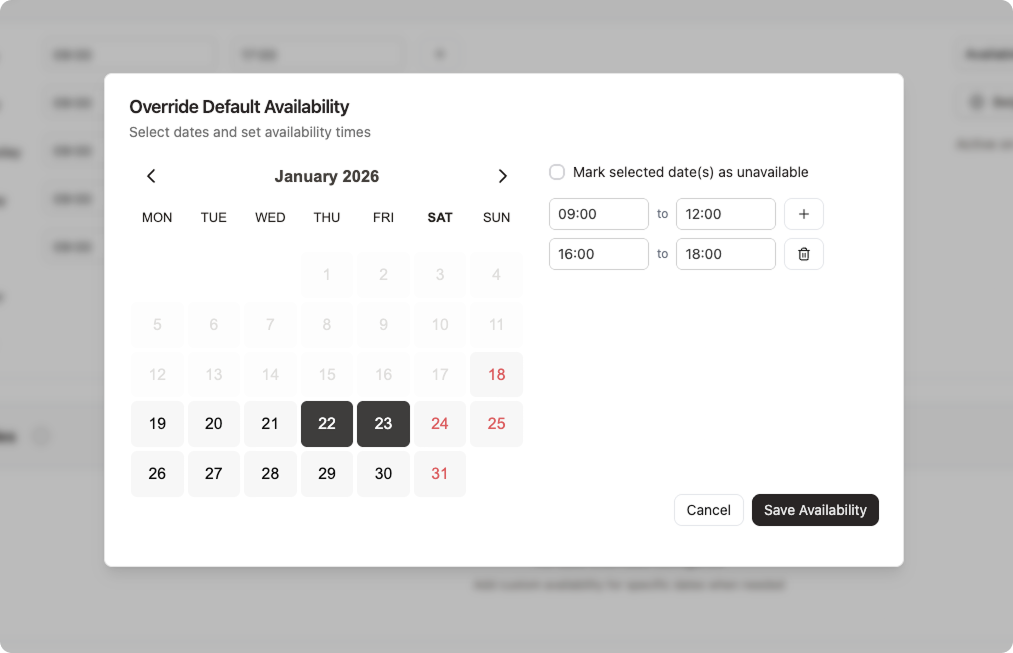
Novacal provides weekly recurring scheduling and allows you to connect unlimited Google, Outlook, iCloud, and Zoho calendars, which are used to check for conflicts when generating your availability. When you need different hours for specific days—like blocking time for a conference or setting special holiday hours—you can use custom availability to override your default weekly schedule.
How to set custom availability:
- Go to theAvailability page from the sidebar
- Click "Override Availability" in the section below—this opens a pop-up
- Select the day(s) you want to override
- Set your available time ranges on the right side, or mark the day as unavailable
Once you've configured custom availability, Novacal will prioritize it over your recurring weekly schedule for those specific days.
Important note: Custom availability is tied to specific availability schedules, which are assigned to your event types. This allows you to override availability differently for different event types on the same days, so changes only affect the event types using that specific availability schedule.